November, 2001
Vienna. In November 2001, the second user workshop were started for the INTELLECT consortium. This user workshop took place in Vienna by the partner Anecon with help of the INTELLECT consortium. Some potential customer companies were invited like Application Service Providers (ASPs) and Internet Service Providers (ISPs). The goal was to present the INTELLECT prototype as common product which can be used as a modular system.
The central functionality which has been presented was the order processing
which means that the term order processing (OP) is used for all the processes, that take
place in an eShop after the customer has expressed his decision to buy the goods he has selected.
Order
processing turns out to consist mainly of the following components:
- a well
defined information flow in the merchant’s backoffice
- communication
over different media:
- between
different parties (consumer, merchant, business partners, suppliers, ...)
- between
different backoffice systems, which have to be integrated (legacy
systems, accounting software, fax, mail system, ...)
An automatic order processing module will offer the following adantages over
manual processing:
- higher
reliability
- less
personnel cost
- quicker
execution of Order Processing
- automatic
state tracking for the merchant
- customer
can query state of order
Integration with eShop:
The
order processing module gets a completed order from the shop module, that means
the customer has already provided all necessary data.
The order data itself is represented as an XML document, because this
provides the greatest flexibility in terms of further processing.
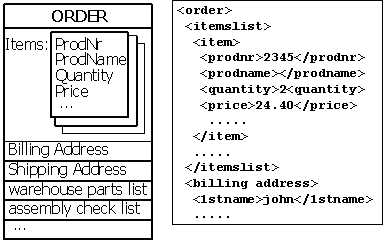
Representation of an order as an xml document
Integration with backoffice process
The order processing module integrates and/or replaces the existing handling of incoming orders. This module
has to interface with all the necessary backoffice systems like stock control system, accounting software,
backoffice systems from other offices, etc. There are many different levels of automation for OP processes. Also
human interaction can be necessary in the backoffice process for an order, since not all processes can be automated;
computer to human communication via printing documents, mail, fax, sms, etc. must be supported.
The processes following a purchase are all offline. The
starting point of any order processing is the handing over of the order, the
shop gives all the necessary data to the order processing module via an XML
document. This order then passes through a sequence of stages that do some
processing with the order.
Orders
will flow through a definable series of stages, where each stage does some work
on the order and passes the order on to the next stage.
Such
stages, called order processing components, encapsulate functionalities like
sending a confirmation to a customer, ordering a product from a supplier via
b2b functionality, generating an assembling list etc.
The
different order processing components can use different communication media
like http, mail, tcp/ip, soap etc. to communicate with other systems. Payment
can also be handled by this module (the payment system can be viewed just like
any other backoffice system).
The sequence of the different order processing components is defined by
an administrator; this can further be facilitated by a graphical user
interface. Branches and/or optional order processing components are used to
achieve the necessary flexibility.
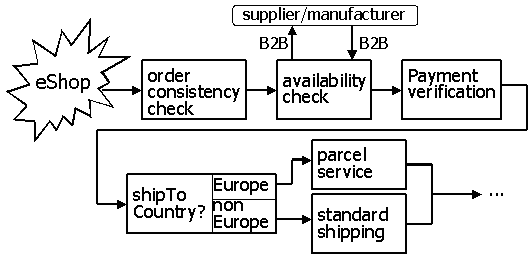
Example for an order processing workflow
The order processing must be configurable for the different needs of
different merchants, because the organisation of order processing varies widely
between different merchants, and it is even also likely that a merchant wants
to change the process from time to time. Therefore it is important to define a
very flexible architecture.
Examples for order processing components are
- credit
card authorisation
- stock
inquiry/update
- interactions
with an accounting software
- shipping
cost calculator
- generation
of parts list, work instructions
- archiving
of orders
- print
shipping document/delivery note/invoice
- inform
customer about delivery(mail delivery note)
An order processing component gets an order as input, does some
processing based on configuration parameters and passes the order to the next
order processing component.
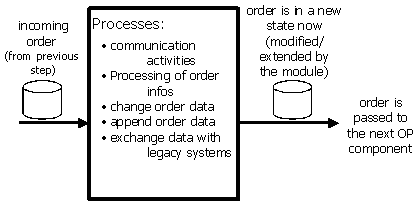
Activities of an order processing module
Communication with business partners (b2b) or customers
The customer has to get an online confirmation for the order. The customer should have the possibility to have a look at all the orders, he previously made in
the eShop.
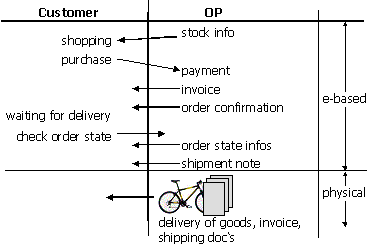
Flow of communication between customer and order processing
The tracking of the order state can take place either actively by the
customer (customer logs in and can have a look at the state) or actively by the
order module by sending state info to the customer via email, sms, fax, etc.
when the state of an order has changed.
The customer should also be able to select
- the
amount of information he wants to receive (every order state change, only
delivery,...)
- the
media used for this info (email/SMS/fax/phone/...)
To offer flexibility for the customer, many different communication
media should be supported (fax/mail/wap/phone/web/...)
B2B communication
More
and more suppliers, producers and merchants aimed at business customers provide
B2B func-tionality, which means that some business interactions can be executed
automatically.
State of the art for this kind of interactions is:
- Use of
HTTP and SMTP as transport protocol
- Use of
XML as data format (with standardised schemas, e.g. from biztalk.org)
- Use of
digital certificates for signing messages
- Use of
SSL or public/private keypairs for encryption
The order processing module will provide pt. 1 and 2.